


Digital Camera HD - 4K Camera
3.822.00 Reviews
App Specs
- Version
- 1.1.0
- Updated On
- License
- Free
- Downloads
- 5,000,000+
- Developer
- BUSSID STUDIO
- Categories
- Photography
- Platform
- Android
Screenshots

 Analysis by AppCompare
I don’t think a camera app can turn a phone into a DSLR, and that is the right expectation to bring to Digital Camera HD - 4K Camera. What it can offer is another way to approach taking photos and video on a phone, with camera-focused controls and a selfie option. I see its appeal most clearly for people who enjoy experimenting with how they shoot, rather than anyone expecting a guaranteed jump in image quality. It is a free photography app from BUSSID STUDIO, and its broad reach suggests plenty of people are willing to give it a try, though its modest average rating is a reminder to keep expectations measured.
What to expect from a separate camera app
A dedicated camera app can be useful when you want to think more deliberately about a shot instead of opening the phone’s default camera and tapping the shutter. The practical question is whether the extra controls make your routine easier. If your phone’s built-in camera already gives you the options you need, switching apps may add friction rather than improve the result. I’d treat this as an alternative to test alongside the camera you already use, not an automatic replacement.
That distinction matters because terms such as “4K” describe a capture format, not a promise that every clip will look cinematic. The phone’s camera hardware, available light, steadiness, and the way you frame a scene all shape the result. Before relying on a new camera app for an important event, I’d make a short test clip and review it on the device or screen where I plan to share it. That small check can show whether the selected camera and recording setup suit the job.
Small habits that make it more useful
For everyday shooting, I’d start with a simple comparison: photograph the same subject with this app and the phone’s built-in camera, from the same position and in similar light. Look at focus, color, and how easy each app makes it to capture the moment. This is more informative than judging a camera app from its feature names alone, and it helps you decide which one to open by default.
Manual controls are most useful when you change one setting at a time. For instance, if a moving subject looks blurred, experiment with shutter speed and check whether the change helps without making the image too dark. If colors feel off under indoor lighting, try adjusting white balance before applying a filter. These are practical ways to learn what the controls do; they are not guarantees that every phone will expose or process the scene identically.
Filters can also be easier to use as a finishing choice than as a starting point. I’d first capture a version that looks natural, then decide whether an effect supports the mood or distracts from the subject. For a photo you plan to reuse in different places, a restrained look is often more flexible than a strong effect that is hard to undo. That makes the app’s creative options most valuable when they help you make a deliberate choice, rather than encourage editing for its own sake.
Where it fits into a normal day
Imagine stopping on a walk when the light is changing and wanting both a quick photo and a short video of the view. A separate camera app can make sense if you have already chosen your preferred settings and can open the right capture mode without fuss. If the moment is fleeting, though, the familiar default camera may be the better tool simply because you know where everything is. I would practice with the app before a trip or family occasion, rather than learning its layout while the moment is happening.
Worth Reading Before You Choose

EA SPORTS FC Mobile 26 Is a Bigger Football Game, but It Takes Time

Flipboard Shows What News Apps Must Do Beyond the Feed

Switching to Android Auto Means Rethinking Your Driving Routine

Google Calendar Makes a Crowded Week Easier to Manage

Ludo King Makes the Most of the Minutes Between Plans

Baby Panda World Brings Quick Play to Modern Phones, but Its Game Library Feels Busy
The selfie camera makes the app relevant for casual self-portraits and video messages, but the same basic trade-off applies: convenience matters as much as the available controls. For a quick group picture, check framing and light before trying to adjust several settings. For a planned selfie, a little experimentation can help you find a comfortable angle and a look you like. In either case, reviewing a sample first is a sensible way to see how the app behaves with your particular phone.
Who should give it a try
I’d recommend trying it if you like exploring exposure, white balance, filters, and video capture in one camera-focused experience, and you are happy to judge it on your own device. It may also suit someone who wants to learn how settings affect a photo without buying a dedicated camera. If you mostly take quick snapshots and value the fewest possible taps, your standard camera app may remain the more practical choice. People who need predictable results for paid work or an important one-time event should test any alternative carefully instead of making it their only camera at the last minute.
There is also a useful distinction between experimenting and depending on a feature. A control can be enjoyable to explore without being essential to your everyday routine, and a high-resolution recording option is only helpful if your phone can capture it comfortably and you have a reason to keep or share large video files. I’d check a brief sample for smoothness and usable detail before recording something long. That habit helps avoid discovering only later that a chosen setting was inconvenient for the clip you actually needed.
The app is free, rated for Everyone, and runs on Android devices with version 7.0 or later. Its current release is version 1.0.5; it has passed one million installs and has an average rating of 3.2 from around 2,200 ratings. Those figures make it a widely tried option, not a guarantee that it will suit every phone or shooting style. I’d use the rating as a prompt to test it for myself, not as a verdict on the camera hardware in my own device.
Have you ever wished that your smartphone camera could deliver shots that rival those from a professional DSLR? Enter the Digital Camera HD - 4K Camera app. This app is like the magic wand of photography apps, promising to transform your phone into a high-performance camera with just a few taps. Let’s dive into what makes this app a must-have for photography enthusiasts.
Getting to Know the App
So, what’s the deal with the Digital Camera HD - 4K Camera? Essentially, it’s an app designed to enhance the photographic capabilities of your smartphone. Whether you’re a casual snapper or a budding photographer, this app aims to offer something for everyone. The interface is sleek and intuitive, making it easy for anyone to navigate, even if you’re not particularly tech-savvy.
One of the first things I noticed upon launching the app is its user-friendly layout. Everything is right where you need it, and the controls are straightforward. The app offers a range of features that allow you to tweak and adjust your photos to perfection. From adjusting exposure to playing with contrast, the possibilities are almost endless.
Features That Stand Out
Now, let’s talk features. The app boasts a range of professional-grade tools that make it stand out from the crowd. Here are a few that caught my eye:
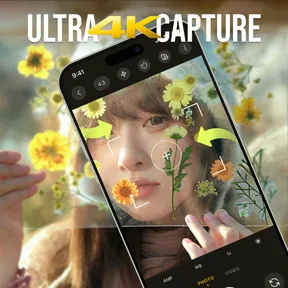
- 4K Video Recording: Yes, you read that right. The app lets you record in stunning 4K quality, making your videos look ultra-crisp and professional.
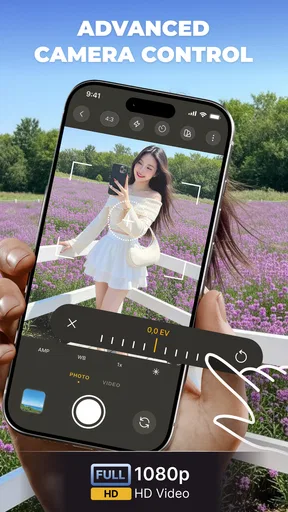
- Manual Controls: For those who like to have more control over their shots, the manual settings are a dream come true. Adjust ISO, shutter speed, and white balance to get the perfect shot every time.
- Filters and Effects: With a wide variety of filters and effects, you can let your creativity run wild. Whether you’re going for a vintage look or something more modern, there’s a filter for every mood.
It’s worth mentioning the app’s performance is surprisingly smooth. Even when using the more advanced features, it doesn’t lag or crash, which is a big plus in my book.
Using the App in Real Life
So how does it hold up in the real world? Well, I took the app for a spin during a weekend hike, and the results were impressive, to say the least. The photos captured the vibrant colors of nature with stunning clarity, and the 4K video feature made my clips look like something out of a travel documentary.
What I love most is how the app makes complex photography techniques accessible to everyone. You don’t need to have a degree in photography to take amazing photos. Just a bit of curiosity and creativity, and you’re good to go!
The Final Verdict
All in all, the Digital Camera HD - 4K Camera is a fantastic app for anyone looking to up their photography game without investing in expensive equipment. It’s packed with features that cater to both beginners and more experienced users, and it does so without overwhelming you with complexity.
Whether you’re capturing your everyday life or special moments, this app gives you the tools to do it beautifully. If you’re still on the fence, I’d say give it a try. It might just become your go-to camera app!
Pros
- High-resolution 4K video recording.
- User-friendly interface for easy navigation.
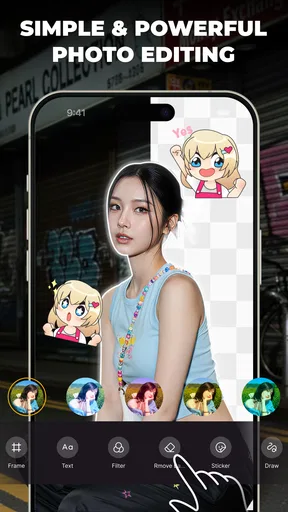
- Advanced editing tools for quick retouching.
- Wide variety of filters and effects.
- Seamless social media sharing options.
Cons
- In-app ads can be intrusive.
- Requires high storage space.
- Occasional lag with older devices.
- Limited free features without subscription.
- Battery consumption is relatively high.
FAQs for Digital Camera HD - 4K Camera
What features does Digital Camera HD - 4K Camera offer?
Digital Camera HD - 4K Camera boasts a range of features including 4K video recording, high-resolution photo capture, professional-grade editing tools, and a variety of filters and effects. Additionally, it has a user-friendly interface that allows for easy navigation and quick access to its advanced settings, making it ideal for both beginners and experienced photographers.
Is Digital Camera HD - 4K Camera compatible with all devices?
The app is designed to be compatible with most modern Android and iOS devices. However, the performance may vary based on your device's specifications. It's recommended to check the app's requirements on the app store to ensure your device meets the necessary hardware and software standards for optimal use.
Does the app require an internet connection to function?
Digital Camera HD - 4K Camera primarily works offline, allowing you to capture and edit photos and videos without an internet connection. However, certain features like cloud storage integration or downloading additional filters may require internet access. It’s advisable to have a stable connection for updates and feature enhancements.
Are there any in-app purchases or subscriptions?
Yes, while Digital Camera HD - 4K Camera offers a range of free features, it also includes in-app purchases. These purchases can enhance your experience by unlocking premium features, additional filters, and advanced editing tools. There may also be subscription options for ongoing access to all premium content and updates.
How does the app handle user privacy and data security?
Digital Camera HD - 4K Camera adheres to strict privacy policies to ensure user data is protected. The app requires certain permissions to function, such as access to your camera and storage. It does not share personal data with third parties without consent. Always review the privacy policy for detailed information on data handling practices.


